Feature Demo Example
This page provides an overview of the feature_demo example workflow in Merlin. You can download all necessary files by running:
This command creates a directory named feature_demo/ containing all the files required for the example. The directory structure will look like this:
feature_demo/
├── feature_demo.yaml
├── requirements.txt
└── scripts/
    ├── features.json
    ├── hello_world.py
    └── pgen.py
File Descriptions
feature_demo.yaml– The Merlin specification file that defines the entire workflow.requirements.txt– Lists the Python packages required to run the workflow.scripts/features.json– A schema file used during the feature translation stage to define which data to extract.scripts/hello_world.py– A simple Python script that simulates processing a sample; used as the core computation step.scripts/pgen.py– A Parameter Generator script used to programmatically generate parameter sets.
Script Files
As mentioned above, there are three script files in this example. This section will dive into more detail on the contents of each file. You'll see exactly how each of these files are used in the Spec Breakdown and Running the Study sections below.
The Features Schema File
The features.json file defines a schema for selecting which features to extract from the simulation outputs during the translate step. This file is passed to the spellbook translate command and ensures that only the specified inputs and outputs are retained in the final feature vector used for training and prediction.
This schema instructs Merlin to retain only:
- The
XandZvalues from the inputs section of the simulation output JSON - The
X+Y+Zresult from the outputs section
This allows you to filter out unneeded fields like Y and X*Y*Z from downstream processing.
The Hello World Python Script
The hello_world.py script is a lightweight simulation script that emulates a computational task. It accepts three numerical arguments (X, Y, and Z) via the command line, computes two derived outputs, and writes the results to a JSON file. The outputs are used by downstream stages like collect, translate, and learn.
This script is executed for each sample in the hello step of the workflow.
Example Output File
Code Overview
Imports standard Python modules for argument parsing, JSON writing, and error handling.
The process_args function:
def process_args(args):
    results = {
        "inputs": {"X": args.X, "Y": args.Y, "Z": args.Z},
        "outputs": {
            "X+Y+Z": args.X + args.Y + args.Z,
            "X*Y*Z": args.X * args.Y * args.Z,
        },
    }

    with open(args.outfile, "w") as f:
        json.dump(results, f)
-
Computes two derived quantities:
X + Y + ZX * Y * Z
-
Writes the results to a file (JSON format) named by
-outfileargument (default:hello_world_output.json).
The setup_argparse function:
def setup_argparse():
    parser = argparse.ArgumentParser(description="Process some integers.")
    parser.add_argument("X", metavar="X", type=float, help="The x dimension of the sample.")
    parser.add_argument("Y", metavar="Y", type=float, help="The y dimension of the sample.")
    parser.add_argument("Z", metavar="Z", type=float, help="The z dimension of the sample.")
    parser.add_argument("-outfile", help="Output file name", default="hello_world_output.json")
    return parser
- Defines the CLI arguments expected by the script.
X,Y,Zare required positional arguments.-outfileis an optional keyword argument for the output filename.
The main function:
def main():
    try:
        parser = setup_argparse()
        args = parser.parse_args()
        process_args(args)
        sys.exit()
    except Exception as ex:
        print(ex)
        sys.exit(1)
- Sets up argument parsing
- Runs the
process_args()function - Exits cleanly on success, or with an error message if something goes wrong
The bottom if statement:
Ensures the script can be run as a standalone program.
The Parameter Generator File
The pgen.py file defines a custom parameter generator using the Maestro ParameterGenerator interface. It programmatically specifies a set of parameter values to be used when generating global parameters in the workflow.
This file gives you fine-grained control over how parameters are defined and varied across workflow runs—much more flexible than a static list in the YAML spec.
Code Overview
Imports the ParameterGenerator class from Maestro.
The get_custom_generator function:
- Defines a function that returns a custom
ParameterGeneratorobject. - This function signature is required by Maestro.
    params = {
        "X2": {"values": [1 / i for i in range(3, 6)], "label": "X2.%%"},
        "N_NEW": {"values": [2**i for i in range(1, 4)], "label": "N_NEW.%%"},
    }
-
Two parameters are defined:
X2takes values[1/3, 1/4, 1/5]N_NEWtakes values[2, 4, 8]
-
Labels use a string formatting token (
%%) to name directories likeX2.0.3333,N_NEW.8, etc.
    for key, value in params.items():
        p_gen.add_parameter(key, value["values"], value["label"])

    return pgen
- Adds each parameter to the generator with its list of values and label pattern.
- Returns the fully constructed parameter generator to the calling workflow engine.
Spec Breakdown
The feature_demo example showcases every major block that a Merlin spec file supports. Each block defines a piece of the workflow's behavior—from high-level descriptions and environment variables to specific workflow steps and parameter settings. Below, we break down what each block does and how it contributes to the overall workflow.
Block: description
The description block gives your study a name and a short summary. Here, the name is set via the NAME environment variable (feature_demo), and the description gives a concise overview of the goal: to run 10 "hello world" simulations.
Block: env
env:
variables:
OUTPUT_PATH: ./studies
N_SAMPLES: 10
WORKER_NAME: demo_worker
VERIFY_QUEUE: default_verify_queue
NAME: feature_demo
SCRIPTS: $(MERLIN_INFO)/scripts
HELLO: $(SCRIPTS)/hello_world.py
FEATURES: $(SCRIPTS)/features.json
The env block sets up environment variables used throughout the spec. These values can be referenced using the $(...) syntax in later blocks. Key variables include:
N_SAMPLES: Number of samples to generateHELLO: Path to the main processing scriptFEATURES: Path to the translation schema
This allows the spec to remain modular and DRY (Don't Repeat Yourself).
Block: batch
The batch block specifies where and how the workflow will be executed. In this case, type: local tells Merlin to run all tasks on the local machine rather than submitting to an external scheduler (e.g., Slurm or Flux).
Block: user
user:
study:
run:
hello: &hello_run
cmd: python3 $(HELLO) -outfile hello_world_output_$(MERLIN_SAMPLE_ID).json $(X0) $(X1) $(X2)
max_retries: 1
python3:
run: &python3_run
cmd: |
print("OMG is this in python?")
print("Variable X2 is $(X2)")
shell: /usr/bin/env python3
python2:
run: &python2_run
cmd: |
print "OMG is this in python2? Change is bad."
print "Variable X2 is $(X2)"
shell: /usr/bin/env python2
The user block defines reusable run templates. These are essentially macros that can be referenced by later stages in the study block.
hello: Runs the main script for a single samplepython3_run: Demonstrates a simple command block using Python 3python2_run: Same idea, but with Python 2 for legacy comparison
Using anchors (&...) and references (<<: *...) avoids repeating commands multiple times.
Block: study
The study block defines the workflow pipeline—a series of stages, each with a name, description, and run command. These stages run in a directed order based on dependencies (via the depends field) and form the core of what the workflow does.
Step 1: hello
- name: hello
description: |
process a sample with hello world
run:
<<: *hello_run
task_queue: hello_queue
- Purpose: Runs
hello_world.pyon each sample in the sample file for each parameter set -
Command (via
*hello_run): -
Output: A JSON file for each sample containing computed values
- Parallelization: This step is executed independently for each sample using Celery workers
Step 2: collect
- name: collect
description: |
process the output of the hello world samples, extracting specific features;
run:
cmd: |
echo $(MERLIN_GLOB_PATH)
echo $(hello.workspace)
ls $(hello.workspace)/X2.$(X2)/$(MERLIN_GLOB_PATH)/hello_world_output_*.json > files_to_collect.txt
spellbook collect -outfile results.json -instring "$(cat files_to_collect.txt)"
depends: [hello_*]
task_queue: collect_queue
- Purpose: Aggregates output JSONs from the
hellostep into one file - Input: Output files from all
hellosample runs - Output:
results.jsonfile containing merged simulation outputs - Depends on: All individual
helloruns (denoted byhello_*)
Step 3: translate
- name: translate
description: |
process the output of the hello world samples some more
run:
cmd: spellbook translate -input $(collect.workspace)/results.json -output results.npz -schema $(FEATURES)
depends: [collect]
task_queue: translate_queue
- Purpose: Filters and transforms the aggregated results into a NumPy
.npzfile usingfeatures.json - Input:
results.json,features.json - Output:
results.npz(a structured numeric array) - Depends on:
collect
Step 4: learn
- name: learn
description: |
train a learner on the results
run:
cmd: spellbook learn -infile $(translate.workspace)/results.npz
depends: [translate]
task_queue: learn_queue
- Purpose: Trains a machine learning model (e.g., a random forest regressor) on the translated results
- Input:
results.npz - Output:
random_forest_reg.pkl - Depends on:
translate
Step 5: make_new_samples
- name: make_new_samples
description: |
make a grid of new samples to pass to the predictor
run:
cmd: spellbook make-samples -n $(N_NEW) -sample_type grid -outfile grid_$(N_NEW).npy
task_queue: make_samples_queue
- Purpose: Creates a grid of new input samples to use for prediction
- Input: Uses
N_NEWto define how many new samples to create - Output:
grid_$(N_NEW).npy - Independent: No dependencies; runs in parallel with earlier stages
Step 6: predict
- name: predict
description: |
make a new prediction from new samples
run:
cmd: spellbook predict -infile $(make_new_samples.workspace)/grid_$(N_NEW).npy -outfile prediction_$(N_NEW).npy -reg $(learn.workspace)/random_forest_reg.pkl
depends: [learn, make_new_samples]
task_queue: predict_queue
- Purpose: Uses the trained model to predict outputs for the new samples
-
Input:
- Trained model (
random_forest_reg.pkl) - New sample grid (
grid_$(N_NEW).npy)
- Trained model (
-
Output:
prediction_$(N_NEW).npy - Depends on: Both
learnandmake_new_samples
Step 7: verify
- name: verify
description: |
if learn and predict succeeded, output a dir to signal study completion
run:
cmd: |
if [[ -f $(learn.workspace)/random_forest_reg.pkl && -f $(predict.workspace)/prediction_$(N_NEW).npy ]]
then
touch FINISHED
exit $(MERLIN_SUCCESS)
else
exit $(MERLIN_SOFT_FAIL)
fi
depends: [learn, predict]
task_queue: $(VERIFY_QUEUE)
- Purpose: Verifies that the workflow succeeded by checking for key output files
- Logic: If both the model and prediction files exist, it creates a
FINISHEDflag - Output: Touches a
FINISHEDfile or fails gracefully withMERLIN_SOFT_FAIL - Depends on:
learnandpredict
Extra Stages: python3_hello and python2_hello
- name: python3_hello
run:
<<: *python3_run
task_queue: pyth3_q
- name: python2_hello
run:
<<: *python2_run
task_queue: pyth2_hello
- Not part of the main pipeline
- Purpose: Demo stages to show command execution with different Python shells
- Useful for: Illustrating advanced features like custom shells, template reuse, or debugging
Block: global.parameters
The global.parameters block defines parameters that affect the entire study. These values are used to sweep over combinations, create directory structures, and influence workflow logic. If you use the pgen.py script these values will be replaced with the generated parameters.
In this example:
X2is used in thehellorunN_NEWcontrols how many new samples are generated inmake_new_samplesand predicted inpredict
This block supports parameter sweeps and works in tandem with the merlin.samples block (below).
Block: merlin
merlin:
resources:
task_server: celery
overlap: False
workers:
$(WORKER_NAME):
args: -l INFO --concurrency 3 --prefetch-multiplier 1 -Ofair
samples:
generate:
cmd: |
cp -r $(SPECROOT)/scripts $(SCRIPTS)
spellbook make-samples -n $(N_SAMPLES) -outfile=$(MERLIN_INFO)/samples.npy
file: $(MERLIN_INFO)/samples.npy
column_labels: [X0, X1]
level_max_dirs: 25
The merlin block configures runtime resources (like workers) and sample management.
-
resources:- Sets the
task_serverto Celery for distributed execution - Defines a worker (
demo_worker) and passes it arguments for concurrency and task distribution
- Sets the
-
samples:- Generates a
.npyfile containing samples ofX0andX1 - Specifies labels for sample columns and directory organization
- Generates a
This block is essential for defining how the workflow scales, executes, and organizes its data.
The DAG and Full Spec
Below is the DAG generated by this feature_demo workflow.
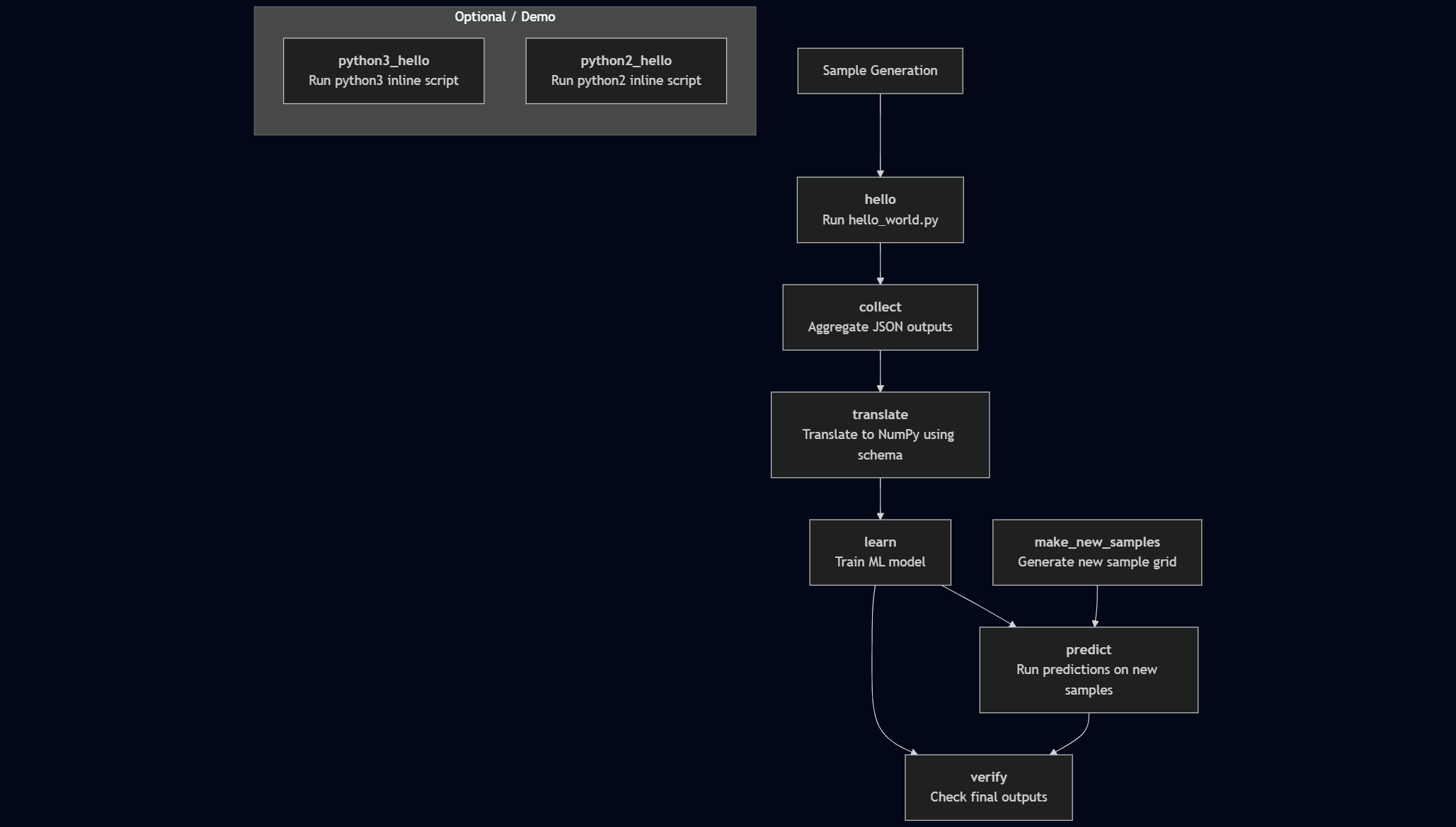
By combining all of the blocks discussed above, our full spec file becomes:
Full Hello Spec
description:
  name: $(NAME)
  description: Run 10 hello worlds.
batch:
type: local
env:
  variables:
    OUTPUT_PATH: ./studies
    N_SAMPLES: 10
    WORKER_NAME: demo_worker
    VERIFY_QUEUE: default_verify_queue
    NAME: feature_demo
    SCRIPTS: $(MERLIN_INFO)/scripts
    HELLO: $(SCRIPTS)/hello_world.py
    FEATURES: $(SCRIPTS)/features.json
user:
study:
run:
hello: &hello_run
cmd: |
python3 $(HELLO) -outfile hello_world_output_$(MERLIN_SAMPLE_ID).json $(X0) $(X1) $(X2)
max_retries: 1
python3:
run: &python3_run
cmd: |
print("OMG is this in python?")
print("Variable X2 is $(X2)")
shell: /usr/bin/env python3
python2:
run: &python2_run
cmd: |
print "OMG is this in python2? Change is bad."
print "Variable X2 is $(X2)"
shell: /usr/bin/env python2
study:
- name: hello
  description: |
     process a sample with hello world
  run:
    <<: *hello_run
    task_queue: hello_queue
- name: collect
  description: |
     process the output of the hello world samples, extracting specific features;
  run:
     cmd: |
         echo $(MERLIN_GLOB_PATH)
         echo $(hello.workspace)
         ls $(hello.workspace)/X2.$(X2)/$(MERLIN_GLOB_PATH)/hello_world_output_*.json > files_to_collect.txt
         spellbook collect -outfile results.json -instring "$(cat files_to_collect.txt)"
     depends: [hello_*]
     task_queue: collect_queue
- name: translate
  description: |
     process the output of the hello world samples some more
  run:
     cmd: spellbook translate -input $(collect.workspace)/results.json -output results.npz -schema $(FEATURES)
     depends: [collect]
     task_queue: translate_queue
- name: learn
  description: |
     train a learner on the results
  run:
     cmd: spellbook learn -infile $(translate.workspace)/results.npz
     depends: [translate]
     task_queue: learn_queue
- name: make_new_samples
  description: |
     make a grid of new samples to pass to the predictor
  run:
     cmd: spellbook make-samples -n $(N_NEW) -sample_type grid -outfile grid_$(N_NEW).npy
     task_queue: make_samples_queue
- name: predict
  description: |
     make a new prediction from new samples
  run:
     cmd: spellbook predict -infile $(make_new_samples.workspace)/grid_$(N_NEW).npy -outfile prediction_$(N_NEW).npy -reg $(learn.workspace)/random_forest_reg.pkl
     depends: [learn, make_new_samples]
     task_queue: predict_queue
- name: verify
  description: |
     if learn and predict succeeded, output a dir to signal study completion
  run:
     cmd: |
        if [[ -f $(learn.workspace)/random_forest_reg.pkl && -f $(predict.workspace)/prediction_$(N_NEW).npy ]]
        then
            touch FINISHED
            exit $(MERLIN_SUCCESS)
        else
            exit $(MERLIN_SOFT_FAIL)
        fi
     depends: [learn, predict]
     task_queue: $(VERIFY_QUEUE)
- name: python3_hello
description: |
do something in python
run:
<<: *python3_run
task_queue: pyth3_q
- name: python2_hello
description: |
do something in python2, because change is bad
run:
<<: *python2_run
task_queue: pyth2_hello
global.parameters:
  X2:
    values : [0.5]
    label  : X2.%%
  N_NEW:
    values : [10]
    label  : N_NEW.%%
merlin:
resources:
task_server: celery
overlap: False
workers:
$(WORKER_NAME):
args: -l INFO --concurrency 3 --prefetch-multiplier 1 -Ofair
samples:
generate:
cmd: |
cp -r $(SPECROOT)/scripts $(SCRIPTS)
spellbook make-samples -n $(N_SAMPLES) -outfile=$(MERLIN_INFO)/samples.npy
# can be a file glob of numpy sample files.
file: $(MERLIN_INFO)/samples.npy
column_labels: [X0, X1]
level_max_dirs: 25
Running the Study
To run this study we first need to send the tasks to the central server with:
If this ran successfully, you should see something similar to the following:
Output From Sending Tasks to the Server
       *
   *~~~~~
  *~~*~~~*      __  __           _ _
 /   ~~~~~     |  \/  |         | (_)
     ~~~~~     | \  / | ___ _ __| |_ _ __
    ~~~~~*     | |\/| |/ _ \ '__| | | '_ \
   *~~~~~~~    | |  | |  __/ |  | | | | | |
  ~~~~~~~~~~   |_|  |_|\___|_|  |_|_|_| |_|
 *~~~~~~~~~~~
   ~~~*~~~*    Machine Learning for HPC Workflows


 v. 1.13.0b2

[2025-07-02 13:36:44: INFO] Loading specification from path: /path/to/feature_demo/feature_demo.yaml
[2025-07-02 13:36:44: INFO] Made dir(s) to output path '/path/to/feature_demo/studies'.
[2025-07-02 13:36:44: INFO] OUTPUT_PATH: studies
[2025-07-02 13:36:44: INFO] Study workspace is '/path/to/feature_demo/studies/feature_demo_20250702-133644'.
[2025-07-02 13:36:44: INFO] Study with name 'feature_demo' does not yet have an entry in the database. Creating one.
[2025-07-02 13:36:44: INFO] Logical worker with name 'demo_worker' and queues '{'[merlin]_predict_queue', '[merlin]_make_samples_queue', '[merlin]_hello_queue', '[merlin]_default_verify_queue', '[merlin]_pyth3_q', '[merlin]_collect_queue', '[merlin]_learn_queue', '[merlin]_pyth2_hello', '[merlin]_translate_queue'}' does not yet have an entry in the database. Creating one.
[2025-07-02 13:36:45: INFO] Generating samples...
[2025-07-02 13:36:50: INFO] Generating samples complete!
[2025-07-02 13:36:50: INFO] Loading samples from 'samples.npy'...
[2025-07-02 13:36:50: INFO] 10 samples loaded.
[2025-07-02 13:36:50: INFO] Calculating task groupings from DAG.
[2025-07-02 13:36:50: INFO] Converting graph to tasks.
[2025-07-02 13:36:50: INFO] Launching tasks.
WARNING:celery.backends.redis:
Setting ssl_cert_reqs=CERT_NONE when connecting to redis means that celery will not validate the identity of the redis broker when connecting. This leaves you vulnerable to man in the middle attacks.
Now to execute these tasks, start the workers:
The workers will immediately start processing the tasks that we sent to the server with the merlin run command.
Once successfully ran you should see ouptut similar to the following with some additional messages from Celery about task execution:
Output From Running Workers
       *
   *~~~~~
  *~~*~~~*      __  __           _ _
 /   ~~~~~     |  \/  |         | (_)
     ~~~~~     | \  / | ___ _ __| |_ _ __
    ~~~~~*     | |\/| |/ _ \ '__| | | '_ \
   *~~~~~~~    | |  | |  __/ |  | | | | | |
  ~~~~~~~~~~   |_|  |_|\___|_|  |_|_|_| |_|
 *~~~~~~~~~~~
   ~~~*~~~*    Machine Learning for HPC Workflows


  v. 1.13.0b2

[2025-07-02 13:41:59: INFO] Loading specification from path: /usr/WS1/gunny/examples/feature_demo/feature_demo.yaml
[2025-07-02 13:41:59: INFO] Launching workers from '/usr/WS1/gunny/examples/feature_demo/feature_demo.yaml'
[2025-07-02 13:41:59: INFO] Logical worker with name 'demo_worker' and queues '{'[merlin]_pyth2_hello', '[merlin]_default_verify_queue', '[merlin]_make_samples_queue', '[merlin]_translate_queue', '[merlin]_pyth3_q', '[merlin]_learn_queue', '[merlin]_hello_queue', '[merlin]_collect_queue', '[merlin]_predict_queue'}' already has an entry in the database.
[2025-07-02 13:41:59: INFO] Starting workers
(merlin_py_3_13) (merlin3_12) [gunny@ruby963:feature_demo]$ [2025-07-02 13:42:02,276: WARNING]
Setting ssl_cert_reqs=CERT_NONE when connecting to redis means that celery will not validate the identity of the redis broker when connecting. This leaves you vulnerable to man in the middle attacks.


-------------- celery@demo_worker.%ruby963 v5.5.2 (immunity)
--- ***** -----
-- ******* ---- Linux-4.18.0-553.56.1.1toss.t4.x86_64-x86_64-with-glibc2.28 2025-07-02 13:42:02
- *** --- * ---
- ** ---------- [config]
- ** ---------- .> app:         merlin:0x1554d70fe120
- ** ---------- .> transport:   rediss://:**@cz-gunny-redismerlin.apps.czapps.llnl.gov:30070/0
- ** ---------- .> results:     rediss://:**@cz-gunny-redismerlin.apps.czapps.llnl.gov:30070/0
- *** --- * --- .> concurrency: 3 (prefork)
-- ******* ---- .> task events: OFF (enable -E to monitor tasks in this worker)
--- ***** -----
-------------- [queues]
                .> [merlin]_collect_queue exchange=[merlin]_collect_queue(direct) key=[merlin]_collect_queue
                .> [merlin]_default_verify_queue exchange=[merlin]_default_verify_queue(direct) key=[merlin]_default_verify_queue
                .> [merlin]_hello_queue exchange=[merlin]_hello_queue(direct) key=[merlin]_hello_queue
                .> [merlin]_learn_queue exchange=[merlin]_learn_queue(direct) key=[merlin]_learn_queue
                .> [merlin]_make_samples_queue exchange=[merlin]_make_samples_queue(direct) key=[merlin]_make_samples_queue
                .> [merlin]_predict_queue exchange=[merlin]_predict_queue(direct) key=[merlin]_predict_queue
                .> [merlin]_pyth2_hello exchange=[merlin]_pyth2_hello(direct) key=[merlin]_pyth2_hello
                .> [merlin]_pyth3_q exchange=[merlin]_pyth3_q(direct) key=[merlin]_pyth3_q
                .> [merlin]_translate_queue exchange=[merlin]_translate_queue(direct) key=[merlin]_translate_queue

[tasks]
. merlin.common.tasks.add_merlin_expanded_chain_to_chord
. merlin.common.tasks.condense_status_files
. merlin.common.tasks.expand_tasks_with_samples
. merlin.common.tasks.merlin_step
. merlin:chordfinisher
. merlin:mark_run_as_complete
. merlin:queue_merlin_study
. merlin:shutdown_workers
Even after all tasks finish, the workers will remain running. This is expected—Celery workers persist until explicitly stopped. To verify that the workflow is done, look for a success message such as:
[2025-07-02 13:42:09,924: INFO] Task merlin:mark_run_as_complete[dc764be7-85ab-4a12-8417-348a34629dbc] succeeded in 0.03240930500032846s: 'Run Completed'
Additionally, to view the status of your workflow, you can use the status command:
If the workflow has finished processing this study then the workers are ready to be stopped:
Expected Output
After running the study, Merlin generates a structured output directory that captures all executed commands and their results for every step in the workflow.
To inspect the full directory structure, use:
You should see something similar to the following:
Successful Directory Structure
studies/feature_demo_<timestamp>/
├── collect/
│   └── X2.0.5/
│       ├── collect_X2.0.5.sh     # Auto-generated script for the collect step
│       ├── collect_X2.0.5.out    # Standard output log
│       ├── collect_X2.0.5.err    # Standard error log
│       ├── files_to_collect.txt  # Input file list for feature collection
│       ├── results.json          # Collected features output
│       ├── MERLIN_FINISHED       # Indicates task success
│       ├── MERLIN_STATUS.json    # Task metadata and status
│       └── status.lock           # Internal control file
├── hello/
│   └── X2.0.5/
│       ├── 00/ through 09/       # One subfolder per sample
│       │   ├── hello_X2.0.5.sh
│       │   ├── hello_X2.0.5.out
│       │   ├── hello_X2.0.5.err
│       │   ├── hello_world_output_<id>.json
│       │   └── MERLIN_FINISHED
│       ├── MERLIN_STATUS.json
│       └── status.lock
├── learn/
│   └── X2.0.5/
│       ├── learn_X2.0.5.sh
│       ├── learn_X2.0.5.out
│       ├── learn_X2.0.5.err
│       ├── random_forest_reg.pkl # Trained model file
│       ├── MERLIN_FINISHED
│       ├── MERLIN_STATUS.json
│       └── status.lock
├── make_new_samples/
│   └── N_NEW.10/
│       ├── make_new_samples_N_NEW.10.sh
│       ├── make_new_samples_N_NEW.10.out
│       ├── make_new_samples_N_NEW.10.err
│       ├── grid_10.npy           # New sample grid
│       ├── MERLIN_FINISHED
│       ├── MERLIN_STATUS.json
│       └── status.lock
├── merlin_info/
│   ├── cmd.sh, cmd.out, cmd.err         # Logs from sample generation
│   ├── feature_demo.orig.yaml           # Original spec file
│   ├── feature_demo.expanded.yaml       # Fully expanded spec with resolved variables
│   ├── feature_demo.partial.yaml        # Spec after early evaluation
│   ├── run_metadata.json                # Study-level metadata
│   ├── samples.npy                      # Initial parameter samples
│   └── scripts/
│       ├── features.json
│       ├── hello_world.py
│       └── pgen.py
├── predict/
│   └── N_NEW.10.X2.0.5/
│       ├── predict_N_NEW.10.X2.0.5.sh
│       ├── predict_N_NEW.10.X2.0.5.out
│       ├── predict_N_NEW.10.X2.0.5.err
│       ├── prediction_10.npy            # Output prediction
│       ├── MERLIN_FINISHED
│       ├── MERLIN_STATUS.json
│       └── status.lock
├── python2_hello/
│   └── X2.0.5/
│       ├── python2_hello_X2.0.5.*
│       ├── MERLIN_FINISHED
│       ├── MERLIN_STATUS.json
│       └── status.lock
├── python3_hello/
│   └── X2.0.5/
│       ├── python3_hello_X2.0.5.*
│       ├── MERLIN_FINISHED
│       ├── MERLIN_STATUS.json
│       └── status.lock
├── translate/
│   └── X2.0.5/
│       ├── translate_X2.0.5.*
│       ├── results.npz                 # Translated data in binary format
│       ├── MERLIN_FINISHED
│       ├── MERLIN_STATUS.json
│       └── status.lock
└── verify/
    └── N_NEW.10.X2.0.5/
        ├── verify_N_NEW.10.X2.0.5.*
        ├── prediction_10.npy
        ├── FINISHED                   # Final success marker for the entire study
        ├── MERLIN_FINISHED
        ├── MERLIN_STATUS.json
        └── status.lock
Each top-level directory (e.g., hello, collect, translate, etc.) corresponds to a step in the workflow defined in the study block of the spec file. Within each of these step directories, you’ll see a hierarchy based on parameter values (such as X2.0.5 or N_NEW.10) used during that run.
Here’s what to look for in the output:
Step Directories (hello/, collect/, etc.)
Each of these directories contains:
- A subdirectory named after the parameter combination (e.g.,
X2.0.5) used for that step. -
Inside each subdirectory, you’ll find files for:
MERLIN_FINISHED: Indicates the task completed successfully.MERLIN_STATUS.json: Contains metadata and status information for the task.status.lock: Used internally to manage step execution.*.sh: The generated shell script that was run.*.outand*.err: Standard output and error logs.- Step-specific outputs (e.g.,
hello_world_output_#.json,results.json,prediction_10.npy, etc.).
merlin_info/ Directory
This directory stores metadata about the study and a copy of the spec:
cmd.sh,cmd.out,cmd.err: Logs from sample generation (merlin.samples.generate.cmd).feature_demo.*.yaml: Versions of the spec file (original, expanded, and partial).samples.npy: The generated parameter samples used in the study.scripts/: A copy of the original scripts used (e.g.,hello_world.py,pgen.py,features.json).run_metadata.json: Metadata about the study run.
Understanding Task Groupings
Some steps (like hello) are run for every sample (e.g., 10 runs in 00–09 subdirectories), while others like learn, predict, and verify are run once per parameter combination. Merlin handles this automatically based on the dependency graph and the sample configuration.
Verifying Workflow Completion
If all tasks finished successfully, each step directory will contain the MERLIN_FINISHED flag, and the verify/ directory will include the final FINISHED file. This is Merlin’s signal that the study completed all tasks correctly.
To confirm that everything ran as expected:
- Look for
MERLIN_FINISHEDin every terminal step. - Verify
FINISHEDis present in theverify/subdirectory. - Optionally, check
MERLIN_STATUS.jsonfiles for detailed execution metadata (e.g., run time, retries, return codes).