Monitoring Studies for Persistent Allocations
Merlin's producer-consumer model ensures the longevity of workers until the batch allocation is terminated or the workers are manually killed by the user. In this framework, workers remain active, processing tasks within a workflow until the allocation concludes or they're deliberately terminated. Consequently, sustaining the vitality of the allocation is crucial during the processing phase, as it guarantees the uninterrupted execution of tasks by the workers.
To preserve an allocation throughout the lifecycle of a worklow, Merlin offers the merlin monitor command. This command serves as a blocking process for a batch submission script, preserving the allocation's continuity while the workers process tasks.
Usage:
How Does the Monitor Work?
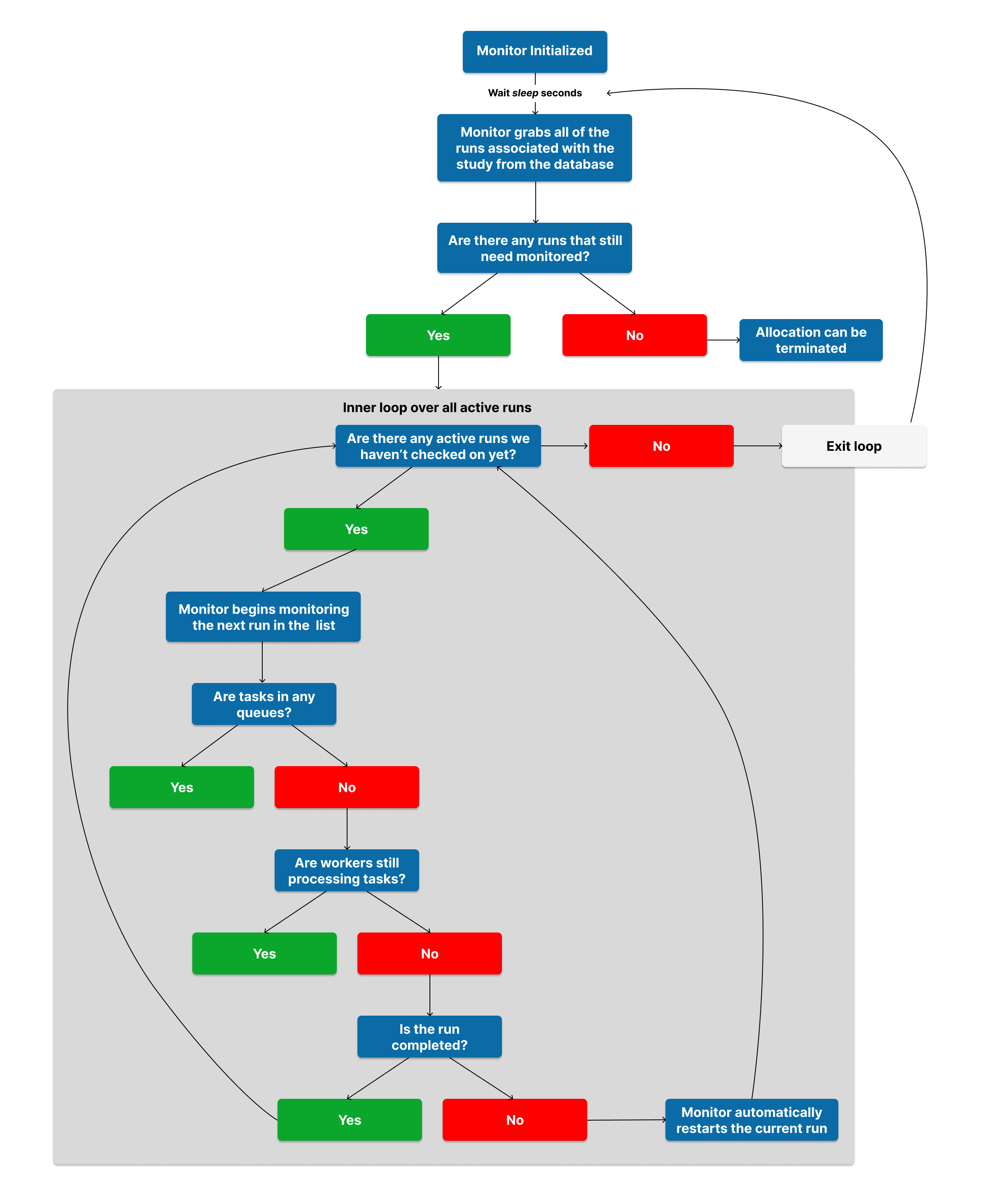
The merlin monitor command uses a spec file to query Merlin's backend database for information about a study. It retrieves the study's entry from the database, including all individual runs associated with the study. The monitor then iterates through each run, ensuring they all complete successfully. Once all runs complete, the monitor will terminate, allowing your allocation to end.
For each run of a study, the monitor ensures completion by performing the following steps:
- Verifying the presence of tasks in the designated queues.
- Confirming the ongoing processing of tasks by the assigned workers when the queues are empty.
- Restarting the study if there are no tasks in the queues and no workers processing tasks, but the workflow has not yet finished. This can be disabled using the
--no-restartoption.
The monitor includes a --sleep option, which introduces a deliberate delay. Before starting, the monitor waits for the specified --sleep duration, giving users time to populate the task queues for their run using the merlin run command. Additionally, the monitor pauses for the --sleep duration between each check of the run. Finally, it will wait up to 10 times the specified --sleep duration for workers to spin up for the run.
A run is considered complete when the monitor reads the run's status entry from the database and it returns a finished status ("COMPLETED", "CANCELLED", or "FAILED"). This entry is always set as the final task of a run.
The resulting flowchart of this process can be seen below.
Database Garbage Collection
When the monitor first starts, it automatically performs garbage collection on the database to identify and remove stale entries. This cleanup process specifically targets:
- Runs: Removes database entries for runs whose corresponding workspace directories no longer exist on the filesystem
- Studies: Removes database entries for studies that have no associated runs remaining after the run cleanup
Worker entries (both logical and physical), are not affected by this automatic garbage collection, as they may be spun up prior to a run being executed.
This automatic cleanup helps maintain database integrity and ensures the monitor is working with accurate, up-to-date information about active studies and runs. The garbage collection can be disabled using the --disable-gc option.
Using the Monitor
Adding the merlin monitor command to your workflow process is as simple as putting it at the end of your worker-startup script. The below templates showcase how this is done for Slurm, LSF, and Flux.
The below batch script can be submitted with:
#!/bin/bash
#SBATCH -N 1
#SBATCH --ntasks-per-node=36
#SBATCH -J Merlin
#SBATCH -t 10:00
#SBATCH -o merlin_workers_%j.out

# Turn off core files to work aroung flux exec issue.
ulimit -c 0

YAML=default.yaml  # (1)

if [[ $# -gt 0 ]]
then
    YAML=$1
fi

echo "Specification File: $YAML"

VENV_PATH=<set the path to the merlin venv here>

# Activate the virtual environment
source ${VENV_PATH}/bin/activate

# Show the workers command
merlin run-workers ${YAML} --echo

# Start workers to run the tasks in the broker
merlin run-workers ${YAML}

# Keep the allocation alive until all workers stop
merlin monitor ${YAML}
- Modifying this value to be the path to your spec file would make it so you didn't have to pass the path in at the command line when submitting this script. In other words, you could submit this script with
sbatch workers.sbatch.
The below batch script can be submitted with:
#!/bin/bash
#BSUB -nnodes 1
#BSUB -W 00:10    # hours:minutes
#BSUB -J Merlin
#BSUB -o merlin_workers_%J.out
#BSUB -e merlin_workers_%J.err
#BSUB -N

# Turn off core files to work aroung flux exec issue.
ulimit -c 0

YAML=default.yaml  # (1)

if [[ $# -gt 0 ]]
then
    YAML=$1
fi

echo "Specification File: $YAML"

VENV_PATH=<set the path to the merlin venv here>

# Activate the virtual environment
source ${VENV_PATH}/bin/activate

# Show the workers command
merlin run-workers ${YAML} --echo

# Start workers to run the tasks in the broker
merlin run-workers ${YAML}

# Keep the allocation alive until all workers stop
merlin monitor ${YAML}
- Modifying this value to be the path to your spec file would make it so you didn't have to pass the path in at the command line when submitting this script. In other words, you could submit this script with
bsub workers.bsub.
The below batch script can be submitted with:
#!/bin/bash
#flux: -N 1
#flux: --job-name Merlin
#flux: -t 10m
#flux: --output merlin_workers_{{id}}.out
#flux: --error merlin_workers_{{id}}.err

# Turn off core files to work aroung flux exec issue.
ulimit -c 0

YAML=default.yaml  # (1)

if [[ $# -gt 0 ]]
then
    YAML=$1
fi

echo "Specification File: $YAML"

VENV_PATH=<set the path to the merlin venv here>

# Activate the virtual environment
source ${VENV_PATH}/bin/activate

# Show the workers command
merlin run-workers ${YAML} --echo

# Start workers to run the tasks in the broker
merlin run-workers ${YAML}

# Keep the allocation alive until all workers stop
merlin monitor ${YAML}
- Modifying this value to be the path to your spec file would make it so you didn't have to pass the path in at the command line when submitting this script. In other words, you could submit this script with
flux batch workers.sh.
Options For the Monitor
There are three useful options that come with the merlin monitor command:
--sleep: The delay between checks on the task queues--no-restart: Disable automatic workflow restarts--disable-gc: Disable automatic garbage collection at startup--steps(Deprecated): Only monitor specific steps in your workflow--vars: Modify environment variables in a spec from the command line
Sleep
The --sleep option in the monitor command allows users to specify a custom delay duration between consecutive inspections of runs. The default value for this option is 60 seconds.
As detailed in the "How Does the Monitor Work?" section, the monitor periodically examines runs to determine the status of their queues, workers, and whether the run is complete or not. If the queues are occupied, workers are processing tasks, or the run is not yet finished, the monitor will enter a sleep state for a designated duration before conducting the next inspection. The --sleep option allows you to modify this sleep interval.
The value that you provide for the --sleep option will be an integer representing the number of seconds to sleep before the next inspection of the run is conducted.
Usage:
Example of Using --sleep With Monitor
In the below spec file we have one step that will run for 90 seconds:
description:
    name: sleep_demo
    description: a very simple merlin workflow

study:
    - name: step_1
      description: sleep for 90 seconds
      run:
        cmd: sleep 90
        task_queue: step_1_queue
For this example we'll use a Slurm worker-launch script to start the workers. Notice on the last line that we're setting the sleep duration to be 30 seconds instead of the default 60 seconds:
#!/bin/bash
#SBATCH -N 1
#SBATCH --ntasks-per-node=36
#SBATCH -J Merlin
#SBATCH -t 10:00
#SBATCH -o merlin_workers_%j.out

# Turn off core files to work aroung flux exec issue.
ulimit -c 0

YAML=sleep_demo.yaml

if [[ $# -gt 0 ]]
then
    YAML=$1
fi

echo "Specification File: $YAML"

VENV_PATH=<set the path to the merlin venv here>

# Activate the virtual environment
source ${VENV_PATH}/bin/activate

# Show the workers command
merlin run-workers ${YAML} --echo

# Start workers to run the tasks in the broker
merlin run-workers ${YAML}

# Keep the allocation alive until all workers stop
merlin monitor ${YAML} --sleep 30
Now let's run this study by submitting this worker launch script and sending the tasks to the broker with the merlin run command:
From the time stamps in our worker logs we can see that the custom 30 second sleep duration was applied:
[2024-02-05 09:13:52,891: INFO] Connected to amqps://rabbitmerlin:**@cz-gunny-rabbitmerlin.apps.czapps.llnl.gov:31118/host4gunny
[2024-02-05 09:13:52,911: INFO] mingle: searching for neighbors
[2024-02-05 09:13:53,956: INFO] mingle: all alone
[2024-02-05 09:13:53,996: INFO] celery@default_worker.%quartz1552 ready.
[2024-02-05 09:13:54,028: INFO] Task merlin.common.tasks.expand_tasks_with_samples[78530a48-95f0-4b0e-90ca-7011e81a7808] received
[2024-02-05 09:13:54,211: INFO] Task merlin.common.tasks.merlin_step[117b28c9-eacd-4e77-9771-01b4ebc29e01] received
[2024-02-05 09:13:54,228: INFO] Executing step 'step_1' in '/usr/WS1/gunny/hello/sleep_demo_20240205-091232/step_1'...
[2024-02-05 09:13:54,228: INFO] Directory does not exist. Creating directories to /usr/WS1/gunny/hello/sleep_demo_20240205-091232/step_1
[2024-02-05 09:13:54,233: INFO] Writing status for step_1 to '/usr/WS1/gunny/hello/sleep_demo_20240205-091232/step_1/MERLIN_STATUS.json...
[2024-02-05 09:13:54,235: INFO] Status for step_1 successfully written.
[2024-02-05 09:13:54,235: INFO] Generating script for step_1 into /usr/WS1/gunny/hello/sleep_demo_20240205-091232/step_1
[2024-02-05 09:13:54,238: INFO] Script: /usr/WS1/gunny/hello/sleep_demo_20240205-091232/step_1/step_1.sh
Restart: None
Scheduled?: True
[2024-02-05 09:13:54,273: INFO] Writing status for step_1 to '/usr/WS1/gunny/hello/sleep_demo_20240205-091232/step_1/MERLIN_STATUS.json...
[2024-02-05 09:13:54,276: INFO] Status for step_1 successfully written.
[2024-02-05 09:13:54,276: INFO] Submitting script for step_1
[2024-02-05 09:13:54,548: INFO] Task merlin.common.tasks.expand_tasks_with_samples[78530a48-95f0-4b0e-90ca-7011e81a7808] succeeded in 0.40144235407933593s: None
[2025-02-20 14:41:27: INFO] Reading app config from file /g/g20/gunny/.merlin/app.yaml
[2025-02-20 14:41:27: INFO] Monitor: Monitoring run with workspace '/usr/WS1/gunny/debug/temp/sleep_demo_20250220-143820'...
[2025-02-20 14:41:27: INFO] Checking for the following workers: ['default_worker']
[2025-02-20 14:41:27: INFO] Overriding default celery config with 'celery.override' in 'app.yaml':
        visibility_timeout:     86400
[2025-02-20 14:41:28: INFO] Monitor: checking for workers, running workers = ['celery@default_worker.%ruby1'] ...
[2025-02-20 14:41:31: INFO] Monitor: Found workers processing tasks, keeping allocation alive.
[2025-02-20 14:42:01: INFO] Checking for the following workers: ['default_worker']
[2025-02-20 14:42:02: INFO] Monitor: checking for workers, running workers = ['celery@default_worker.%ruby1'] ...
[2025-02-20 14:42:04: INFO] Monitor: Found workers processing tasks, keeping allocation alive.
[2025-02-20 14:42:34: INFO] Checking for the following workers: ['default_worker']
[2025-02-20 14:42:35: INFO] Monitor: checking for workers, running workers = ['celery@default_worker.%ruby1'] ...
[2025-02-20 14:42:35,928: INFO] Execution returned status OK.
[2025-02-20 14:42:35,940: INFO] Writing status for step_1 to '/usr/WS1/gunny/debug/temp/sleep_demo_20250220-143820/step_1/MERLIN_STATUS.json...
[2025-02-20 14:42:35,946: INFO] Status for step_1 successfully written.
[2025-02-20 14:42:35,946: INFO] Step 'step_1' in '/usr/WS1/gunny/debug/temp/sleep_demo_20250220-143820/step_1' finished successfully.
[2025-02-20 14:42:36,028: INFO] Task merlin:chordfinisher[75d2720a-de21-473f-bce0-6f8ac0186b14] received
[2025-02-20 14:42:36,030: INFO] Task merlin.common.tasks.merlin_step[/usr/WS1/gunny/debug/temp/sleep_demo_20250220-143820/step_1] succeeded in 91.18941793194972s: 0
[2025-02-20 14:42:36,061: INFO] Task merlin:mark_run_as_complete[0695381d-f9dd-4efb-b397-f47c752d5eb4] received
[2025-02-20 14:42:36,064: INFO] Task merlin:chordfinisher[75d2720a-de21-473f-bce0-6f8ac0186b14] succeeded in 0.03424098785035312s: 'SYNC'
[2025-02-20 14:42:36,093: INFO] Attempting to update run with id '8cd39508-ff77-409f-af7e-1642b95b753b'...
[2025-02-20 14:42:36,094: INFO] Successfully updated run with id '8cd39508-ff77-409f-af7e-1642b95b753b'.
[2025-02-20 14:42:36,107: INFO] Data successfully dumped to /usr/WS1/gunny/debug/temp/sleep_demo_20250220-143820/merlin_info/run_metadata.json.
[2025-02-20 14:42:36,110: INFO] Task merlin:mark_run_as_complete[0695381d-f9dd-4efb-b397-f47c752d5eb4] succeeded in 0.04832656914368272s: 'Run Completed'
[2025-02-20 14:42:37: INFO] Monitor: Run with workspace '/usr/WS1/gunny/debug/temp/sleep_demo_20250220-143820' has completed. Moving on to the next run.
[2025-02-20 14:42:37: INFO] Monitor: ... stop condition met
No Restart
The --no-restart option disables the automatic restart functionality of the monitor. By default, when the monitor detects that a workflow has stalled (no tasks in queues, no workers processing tasks, but the run is not complete), it will automatically attempt to restart the workflow using the merlin restart command.
Using this flag is particularly useful when multiple monitor processes may be running for the same study, as it helps prevent race conditions where multiple monitors might attempt to restart the same workflow simultaneously. This could otherwise lead to duplicate task execution or other unexpected behavior.
Usage:
Example of Using --no-restart With Monitor
Consider a scenario where you have a large study that you're executing with multiple batches of workers, where each batch needs a new merlin monitor to keep the allocation alive. Without the --no-restart flag, if a workflow stalls, multiple monitors might detect this simultaneously and each attempt a restart, potentially causing issues.
This can be resolved by launching all but your first monitor with the --no-restart flag enabled.
#!/bin/bash
#SBATCH -N 1
#SBATCH --ntasks-per-node=36
#SBATCH -J Merlin
#SBATCH -t 10:00
#SBATCH -o merlin_workers_%j.out

# Turn off core files to work around flux exec issue.
ulimit -c 0

YAML=my_study.yaml

if [[ $# -gt 0 ]]
then
    YAML=$1
fi

echo "Specification File: $YAML"

VENV_PATH=<set the path to the merlin venv here>

# Activate the virtual environment
source ${VENV_PATH}/bin/activate

# Show the workers command
merlin run-workers ${YAML} --echo

# Start workers to run the tasks in the broker
merlin run-workers ${YAML}

# Keep the allocation alive until all workers stop
merlin monitor ${YAML} --no-restart
With the --no-restart flag enabled, if the workflow appears to stall, the monitor will log a warning but will not attempt an automatic restart.
Disable Garbage Collection
The --disable-gc option disables the automatic garbage collection that normally runs when the monitor starts. By default, the monitor performs a cleanup of stale database entries for runs and studies before beginning its monitoring loop.
This option is useful when:
- You want to preserve database entries for runs whose workspaces may have been temporarily removed or moved
- Multiple monitor processes are starting simultaneously and you want to avoid race conditions during cleanup
- You're debugging issues and want to examine all database entries, including those that might otherwise be cleaned up
Usage:
Example of Using --disable-gc With Monitor
Suppose you're working on a workflow where workspace directories might be temporarily unavailable due to filesystem issues, but you don't want those runs removed from the database.
#!/bin/bash
#SBATCH -N 1
#SBATCH --ntasks-per-node=36
#SBATCH -J Merlin
#SBATCH -t 10:00
#SBATCH -o merlin_workers_%j.out

# Turn off core files to work around flux exec issue.
ulimit -c 0

YAML=my_study.yaml

if [[ $# -gt 0 ]]
then
    YAML=$1
fi

echo "Specification File: $YAML"

VENV_PATH=<set the path to the merlin venv here>

# Activate the virtual environment
source ${VENV_PATH}/bin/activate

# Show the workers command
merlin run-workers ${YAML} --echo

# Start workers to run the tasks in the broker
merlin run-workers ${YAML}

# Keep the allocation alive until all workers stop
merlin monitor ${YAML} --disable-gc
With --disable-gc, the monitor will skip the initial garbage collection phase and proceed directly to monitoring the workflow, preserving all existing database entries regardless of workspace availability.
Steps
Deprecated
The --steps option is deprecated and set for removal in Merlin v1.14+. If you use this option in Merlin v1.13 you will see the same monitor functionality that existed in Merlin v1.12 and older. In other words, you will not have the auto-restart capability with the monitor.
Warning
It's essential to note that using this option might lead to the termination of the allocation while your study is still processing. This outcome occurs if any subsequent steps in your study were not included in the steps provided to the --steps option.
The --steps option in the monitor command allows you to specify particular steps for monitoring instead of the entire study. By providing specific steps, the monitor identifies the associated task queues and exclusively monitors those queues, disregarding others in the study.
Usage:
Example of Using --steps Option
In the spec file below, we have two steps step_1 and step_2 that each have thier own respective task queues step_1_queue and step_2_queue.
description:
    name: steps_demo
    description: a very simple merlin workflow

study:
    - name: step_1
      description: say hello
      run:
        cmd: echo "hello!"
        task_queue: step_1_queue

    - name: step_2
      description: sleep for 90 seconds
      run:
        cmd: sleep 90
        depends: [step_1]
        task_queue: step_2_queue
Let's say we just want to monitor step_1 to make sure it finishes but we don't care if step_2 finishes. We can convey this to our monitor by using the --steps option. This is shown in the worker-launch script below (for this example we'll use a Slurm batch script):
#!/bin/bash
#SBATCH -N 1
#SBATCH --ntasks-per-node=36
#SBATCH -J Merlin
#SBATCH -t 10:00
#SBATCH -o merlin_workers_%j.out

# Turn off core files to work aroung flux exec issue.
ulimit -c 0

YAML=steps_demo.yaml

if [[ $# -gt 0 ]]
then
    YAML=$1
fi

echo "Specification File: $YAML"

VENV_PATH=<set the path to the merlin venv here>

# Activate the virtual environment
source ${VENV_PATH}/bin/activate

# Show the workers command
merlin run-workers ${YAML} --echo

# Start workers to run the tasks in the broker
merlin run-workers ${YAML}

# Keep the allocation alive until all workers stop
merlin monitor ${YAML} --steps step_1
After submitting this batch script and sending the task queues to the broker with:
...we'll see from the status command and the logs that the allocation is terminated after step_1 finishes but prior to step_2 finishing.
Checking our Slurm queues with:
We'll see our allocation is either in a cancelled state or just not there at all. This means our workers are no longer processing anything.
Now if we check the status of our study, we'll see that step_1 finished just fine but the status of step_2 was never updated to a completed state since it never finished processing before the allocation was terminated:
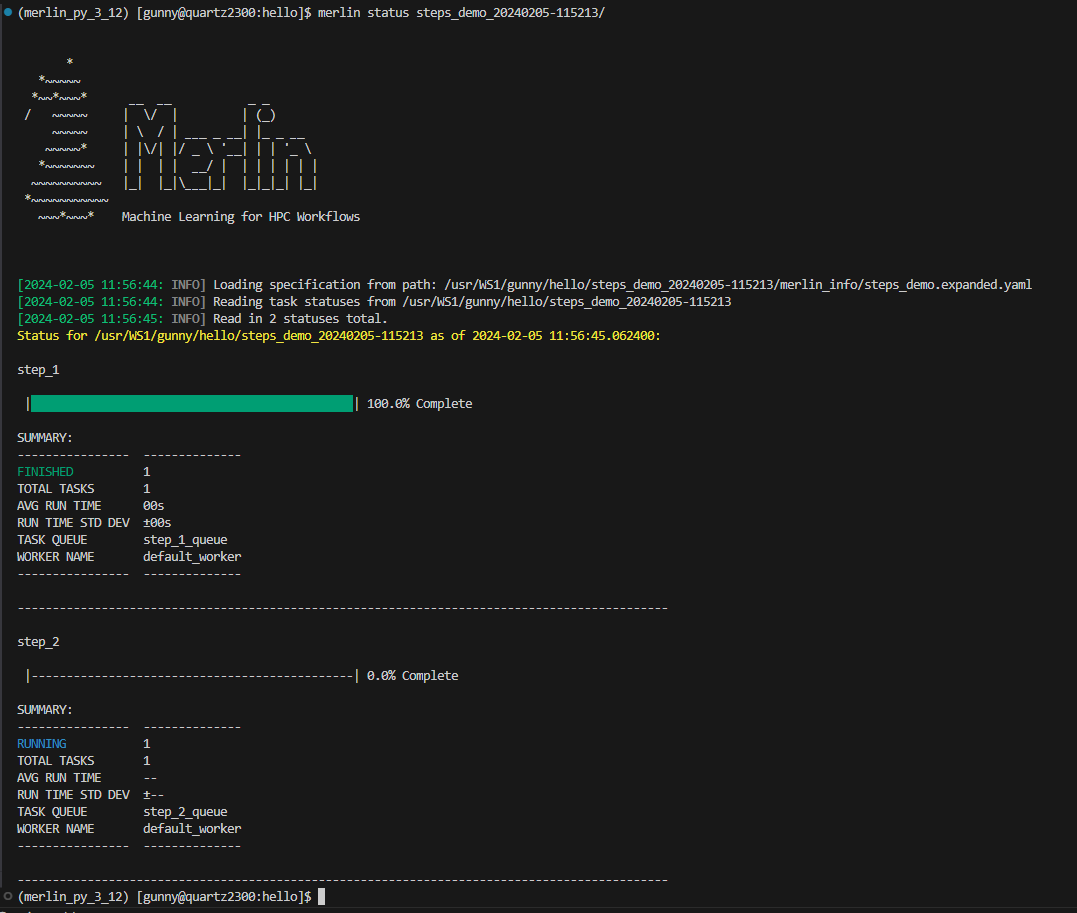
Focusing on the highlighted lines below, we'll see that step_1 logs that it starts executing and that it finishes executing. For step_2 we see a similar log for when it starts but we never see a log for when it finishes. Instead, it's execution is cut off by the monitor terminating the allocation since we told it to only monitor step_1.
[2024-02-05 11:53:18,915: INFO] Connected to amqps://rabbitmerlin:**@cz-gunny-rabbitmerlin.apps.czapps.llnl.gov:31118/host4gunny
[2024-02-05 11:53:18,943: INFO] mingle: searching for neighbors
[2024-02-05 11:53:19,986: INFO] mingle: all alone
[2024-02-05 11:53:20,017: INFO] celery@default_worker.%quartz205 ready.
[2024-02-05 11:53:20,051: INFO] Task merlin.common.tasks.expand_tasks_with_samples[36b7c213-735f-443c-a593-21dd6fbdce82] received
[2024-02-05 11:53:20,237: INFO] Task merlin.common.tasks.merlin_step[661180c7-9921-448d-ad4a-510163fe5dd3] received
[2024-02-05 11:53:20,266: INFO] Executing step 'step_1' in '/usr/WS1/gunny/hello/steps_demo_20240205-115213/step_1'...
[2024-02-05 11:53:20,267: INFO] Directory does not exist. Creating directories to /usr/WS1/gunny/hello/steps_demo_20240205-115213/step_1
[2024-02-05 11:53:20,274: INFO] Writing status for step_1 to '/usr/WS1/gunny/hello/steps_demo_20240205-115213/step_1/MERLIN_STATUS.json...
[2024-02-05 11:53:20,276: INFO] Status for step_1 successfully written.
[2024-02-05 11:53:20,277: INFO] Generating script for step_1 into /usr/WS1/gunny/hello/steps_demo_20240205-115213/step_1
[2024-02-05 11:53:20,281: INFO] Script: /usr/WS1/gunny/hello/steps_demo_20240205-115213/step_1/step_1.sh
Restart: None
Scheduled?: True
[2024-02-05 11:53:20,326: INFO] Writing status for step_1 to '/usr/WS1/gunny/hello/steps_demo_20240205-115213/step_1/MERLIN_STATUS.json...
[2024-02-05 11:53:20,331: INFO] Status for step_1 successfully written.
[2024-02-05 11:53:20,331: INFO] Submitting script for step_1
[2024-02-05 11:53:20,347: INFO] Execution returned status OK.
[2024-02-05 11:53:20,357: INFO] Writing status for step_1 to '/usr/WS1/gunny/hello/steps_demo_20240205-115213/step_1/MERLIN_STATUS.json...
[2024-02-05 11:53:20,362: INFO] Status for step_1 successfully written.
[2024-02-05 11:53:20,362: INFO] Step 'step_1' in '/usr/WS1/gunny/hello/steps_demo_20240205-115213/step_1' finished successfully.
[2024-02-05 11:53:20,427: INFO] Task merlin.common.tasks.merlin_step[29c33e4d-c2c4-4211-bd4d-ba0531f23581] received
[2024-02-05 11:53:20,448: INFO] Executing step 'step_2' in '/usr/WS1/gunny/hello/steps_demo_20240205-115213/step_2'...
[2024-02-05 11:53:20,448: INFO] Directory does not exist. Creating directories to /usr/WS1/gunny/hello/steps_demo_20240205-115213/step_2
[2024-02-05 11:53:20,460: INFO] Writing status for step_2 to '/usr/WS1/gunny/hello/steps_demo_20240205-115213/step_2/MERLIN_STATUS.json...
[2024-02-05 11:53:20,467: INFO] Status for step_2 successfully written.
[2024-02-05 11:53:20,467: INFO] Generating script for step_2 into /usr/WS1/gunny/hello/steps_demo_20240205-115213/step_2
[2024-02-05 11:53:20,483: INFO] Script: /usr/WS1/gunny/hello/steps_demo_20240205-115213/step_2/step_2.sh
Restart: None
Scheduled?: True
[2024-02-05 11:53:20,507: INFO] Task merlin.common.tasks.expand_tasks_with_samples[36b7c213-735f-443c-a593-21dd6fbdce82] succeeded in 0.3326189829967916s: None
[2024-02-05 11:53:20,511: INFO] Task merlin.common.tasks.merlin_step[661180c7-9921-448d-ad4a-510163fe5dd3] succeeded in 0.2548455507494509s: 0
[2024-02-05 11:53:20,535: INFO] Writing status for step_2 to '/usr/WS1/gunny/hello/steps_demo_20240205-115213/step_2/MERLIN_STATUS.json...
[2024-02-05 11:53:20,544: INFO] Status for step_2 successfully written.
[2024-02-05 11:53:20,544: INFO] Submitting script for step_2
[2024-02-05 11:54:13: INFO] Reading app config from file /g/g20/gunny/.merlin/app.yaml
[2024-02-05 11:54:14: INFO] Monitor: found 0 jobs in queues and 1 workers alive
[2024-02-05 11:54:15: INFO] Monitor: ... stop condition met
Vars
The --vars option can be used to modify any variables defined in your spec file from the command line interface. This option can take a space-delimited list of variables and their assignments, and should be given after the input yaml file.
Usage:
Example of Using --vars With Monitor
Say we have the following spec file with a variable QUEUE_NAME that's referenced in step_2:
description:
    name: vars_demo
    description: a very simple merlin workflow

env:
    variables:
        QUEUE_NAME: step_2_queue

study:
    - name: step_1
      description: say hello
      run:
        cmd: echo "hello!"
        task_queue: step_1_queue

    - name: step_2
      description: sleep for 90 seconds
      run:
        cmd: sleep 90
        depends: [step_1]
        task_queue: $(QUEUE_NAME)
If we decided we wanted to modify this queue at the command line, we could accomplish this with the --vars option of the merlin run-workers and merlin run commands:
In the below worker-startup script, we're not using the --vars option with the monitor command. This is for demonstrative purposes and will be modified later in this example.
#!/bin/bash
#SBATCH -N 1
#SBATCH --ntasks-per-node=36
#SBATCH -J Merlin
#SBATCH -t 10:00
#SBATCH -o merlin_workers_%j.out

# Turn off core files to work aroung flux exec issue.
ulimit -c 0

YAML=vars_demo.yaml

if [[ $# -gt 0 ]]
then
    YAML=$1
fi

echo "Specification File: $YAML"

VENV_PATH=<set the path to the merlin venv here>

# Activate the virtual environment
source ${VENV_PATH}/bin/activate

# Show the workers command
merlin run-workers ${YAML} --vars QUEUE_NAME=new_queue_name --echo

# Start workers to run the tasks in the broker
merlin run-workers ${YAML} --vars QUEUE_NAME=new_queue_name

# Keep the allocation alive until all workers stop
merlin monitor ${YAML}  # ***Purposefully not using the --vars argument yet***
This can be submitted with:
Using the above worker launch script that does not utilize the --vars option with the monitor our allocation would terminate after step_1 completes. This is due to the fact that it will be watching the step_1_queue and step_2_queue task queues, but step_2's tasks will be sent to the new_queue_name queue instead. We can see this behavior from the status of our study and the the end of the worker logs.
Checking our Slurm queues with:
We'll see our allocation is either in a cancelled state or just not there at all. This means our workers are no longer processing anything.
Now if we check the status of our study, we'll see that the status of step_2 was never updated to a completed state:
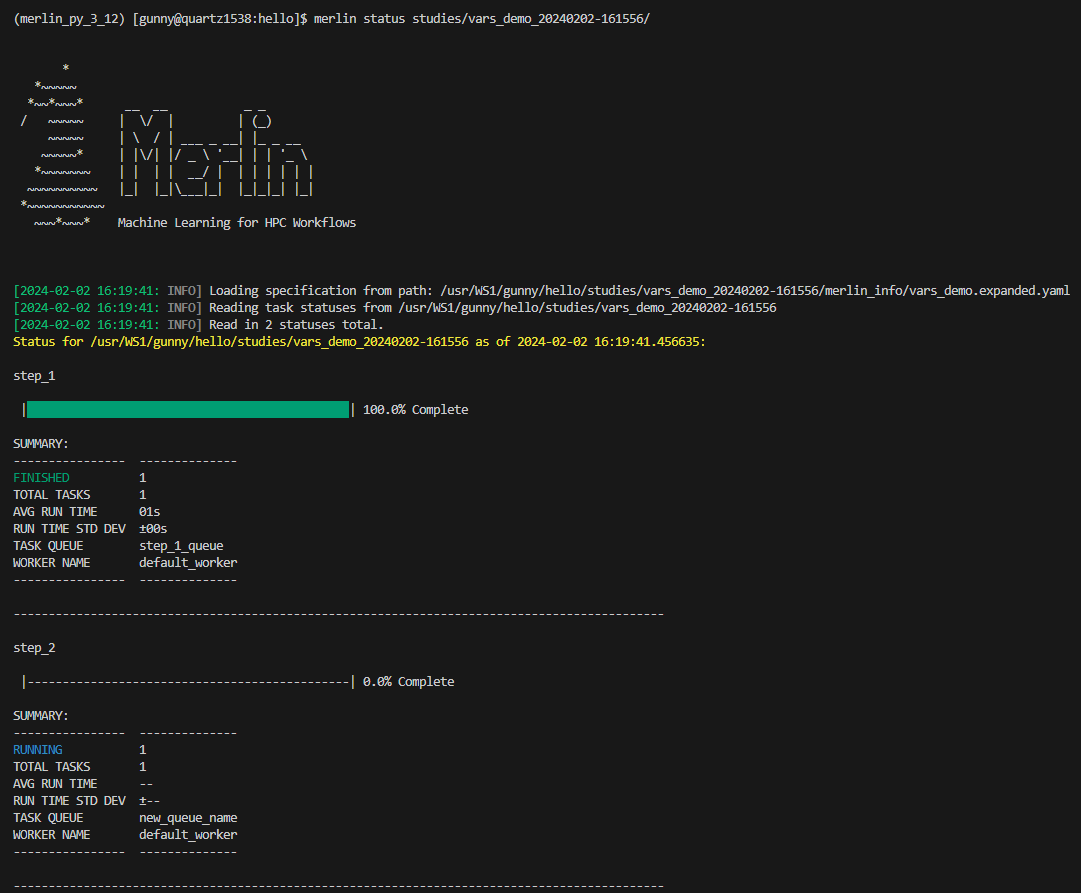
Focusing on the highlighted lines below, we'll see that step_1 logs that it starts executing and that it finishes executing. For step_2 we see a similar log for when it starts but we never see a log for when it finishes. Instead, it's execution is cut off by the monitor terminating the allocation.
[2024-02-02 16:16:51,152: INFO] Connected to amqps://rabbitmerlin:**@cz-gunny-rabbitmerlin.apps.czapps.llnl.gov:31118/host4gunny
[2024-02-02 16:16:51,171: INFO] mingle: searching for neighbors
[2024-02-02 16:16:52,211: INFO] mingle: all alone
[2024-02-02 16:16:52,248: INFO] celery@default_worker.%quartz3 ready.
[2024-02-02 16:16:52,275: INFO] Task merlin.common.tasks.expand_tasks_with_samples[6c4ea50a-9fe4-43ca-b2bc-47ef2a477a21] received
[2024-02-02 16:16:52,449: INFO] Task merlin.common.tasks.merlin_step[09c2c700-fe97-4f18-9847-69615f3e4dfc] received
[2024-02-02 16:16:52,467: INFO] Executing step 'step_1' in '/usr/WS1/gunny/hello/studies/vars_demo_20240202-161556/step_1'...
[2024-02-02 16:16:52,467: INFO] Directory does not exist. Creating directories to /usr/WS1/gunny/hello/studies/vars_demo_20240202-161556/step_1
[2024-02-02 16:16:52,470: INFO] Writing status for step_1 to '/usr/WS1/gunny/hello/studies/vars_demo_20240202-161556/step_1/MERLIN_STATUS.json...
[2024-02-02 16:16:52,472: INFO] Status for step_1 successfully written.
[2024-02-02 16:16:52,472: INFO] Generating script for step_1 into /usr/WS1/gunny/hello/studies/vars_demo_20240202-161556/step_1
[2024-02-02 16:16:52,476: INFO] Script: /usr/WS1/gunny/hello/studies/vars_demo_20240202-161556/step_1/step_1.sh
Restart: None
Scheduled?: True
[2024-02-02 16:16:52,502: INFO] Writing status for step_1 to '/usr/WS1/gunny/hello/studies/vars_demo_20240202-161556/step_1/MERLIN_STATUS.json...
[2024-02-02 16:16:52,505: INFO] Status for step_1 successfully written.
[2024-02-02 16:16:52,505: INFO] Submitting script for step_1
[2024-02-02 16:16:52,516: INFO] Execution returned status OK.
[2024-02-02 16:16:52,520: INFO] Writing status for step_1 to '/usr/WS1/gunny/hello/studies/vars_demo_20240202-161556/step_1/MERLIN_STATUS.json...
[2024-02-02 16:16:52,522: INFO] Status for step_1 successfully written.
[2024-02-02 16:16:52,522: INFO] Step 'step_1' in '/usr/WS1/gunny/hello/studies/vars_demo_20240202-161556/step_1' finished successfully.
[2024-02-02 16:16:52,580: INFO] Task merlin.common.tasks.merlin_step[bffc5866-7d85-4e2b-9a20-b3d195183581] received
[2024-02-02 16:16:52,594: INFO] Executing step 'step_2' in '/usr/WS1/gunny/hello/studies/vars_demo_20240202-161556/step_2'...
[2024-02-02 16:16:52,594: INFO] Directory does not exist. Creating directories to /usr/WS1/gunny/hello/studies/vars_demo_20240202-161556/step_2
[2024-02-02 16:16:52,598: INFO] Writing status for step_2 to '/usr/WS1/gunny/hello/studies/vars_demo_20240202-161556/step_2/MERLIN_STATUS.json...
[2024-02-02 16:16:52,601: INFO] Status for step_2 successfully written.
[2024-02-02 16:16:52,602: INFO] Generating script for step_2 into /usr/WS1/gunny/hello/studies/vars_demo_20240202-161556/step_2
[2024-02-02 16:16:52,605: INFO] Script: /usr/WS1/gunny/hello/studies/vars_demo_20240202-161556/step_2/step_2.sh
Restart: None
Scheduled?: True
[2024-02-02 16:16:52,613: INFO] Writing status for step_2 to '/usr/WS1/gunny/hello/studies/vars_demo_20240202-161556/step_2/MERLIN_STATUS.json...
[2024-02-02 16:16:52,616: INFO] Status for step_2 successfully written.
[2024-02-02 16:16:52,616: INFO] Submitting script for step_2
[2024-02-02 16:16:52,639: INFO] Task merlin.common.tasks.expand_tasks_with_samples[6c4ea50a-9fe4-43ca-b2bc-47ef2a477a21] succeeded in 0.24488114699488506s: None
[2024-02-02 16:16:52,652: INFO] Task merlin.common.tasks.merlin_step[09c2c700-fe97-4f18-9847-69615f3e4dfc] succeeded in 0.18764808497508056s: 0
[2024-02-02 16:17:46: INFO] Reading app config from file /g/g20/gunny/.merlin/app.yaml
[2024-02-02 16:17:47: INFO] Monitor: found 0 jobs in queues and 1 workers alive
[2024-02-02 16:17:48: INFO] Monitor: ... stop condition met
Now let's modify the worker-startup script to utilize the --vars option for the monitor so that it can watch the correct queues:
#!/bin/bash
#SBATCH -N 1
#SBATCH --ntasks-per-node=36
#SBATCH -J Merlin
#SBATCH -t 10:00
#SBATCH -o merlin_workers_%j.out

# Turn off core files to work aroung flux exec issue.
ulimit -c 0

YAML=vars_demo.yaml

if [[ $# -gt 0 ]]
then
    YAML=$1
fi

echo "Specification File: $YAML"

VENV_PATH=<set the path to the merlin venv here>

# Activate the virtual environment
source ${VENV_PATH}/bin/activate

# Show the workers command
merlin run-workers ${YAML} --vars QUEUE_NAME=new_queue_name --echo

# Start workers to run the tasks in the broker
merlin run-workers ${YAML} --vars QUEUE_NAME=new_queue_name

# Keep the allocation alive until all workers stop
merlin monitor ${YAML} --vars QUEUE_NAME=new_queue_name
Re-submitting this workflow, we'll see that the study runs to completion before terminating.
Our status now shows that both steps finished successfully.
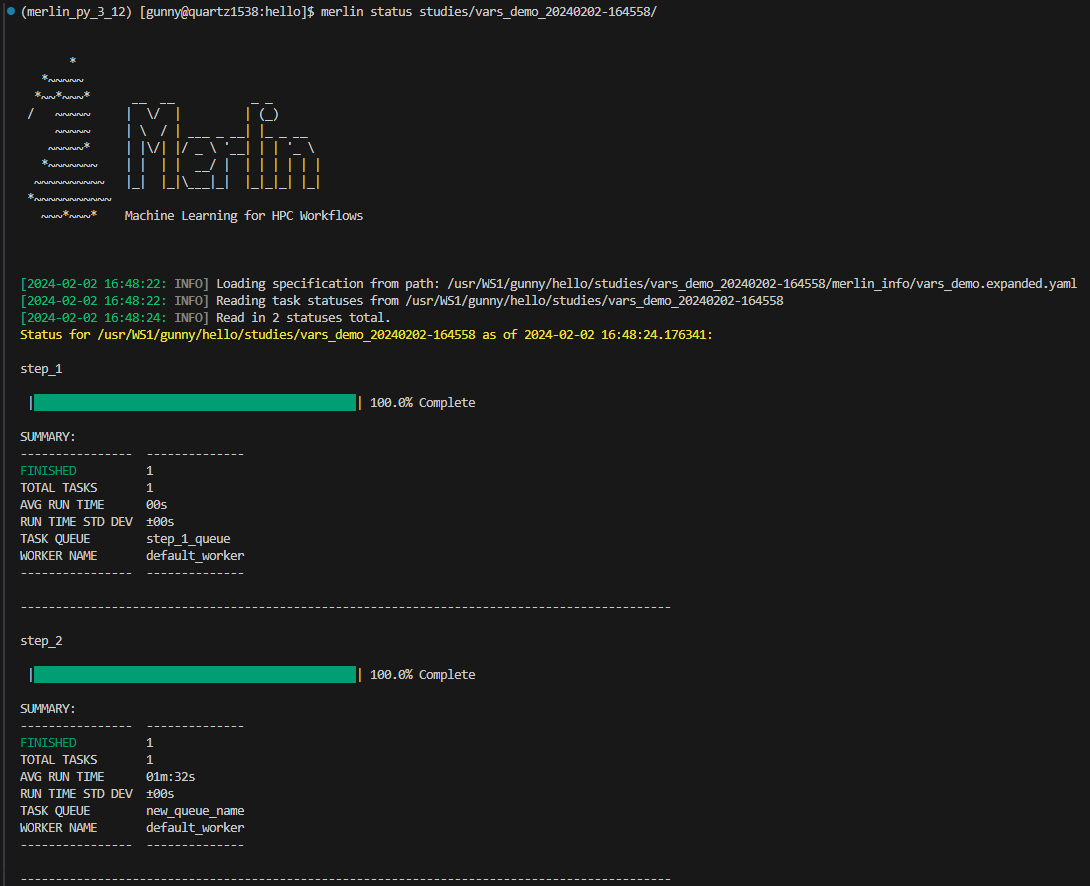
Focusing on the highlighted lines below, we'll see that step_1 and step_2 both log that execution has started and finished. We'll also notice that prior to step_2 finishing, the monitor checks the task queues/workers and determines it should keep the allocation alive. Once step_2 is complete, we see that the monitor then terminates the allocation.
[2024-02-02 16:46:21,634: INFO] Connected to amqps://rabbitmerlin:**@cz-gunny-rabbitmerlin.apps.czapps.llnl.gov:31118/host4gunny
[2024-02-02 16:46:21,660: INFO] mingle: searching for neighbors
[2024-02-02 16:46:22,704: INFO] mingle: all alone
[2024-02-02 16:46:22,737: INFO] celery@default_worker.%quartz8 ready.
[2024-02-02 16:46:22,766: INFO] Task merlin.common.tasks.expand_tasks_with_samples[96a9fe28-cbde-4232-8f42-653646fe032e] received
[2024-02-02 16:46:22,947: INFO] Task merlin.common.tasks.merlin_step[ff620554-6d4d-4981-8488-bec1e718bc68] received
[2024-02-02 16:46:23,156: INFO] Task merlin.common.tasks.expand_tasks_with_samples[96a9fe28-cbde-4232-8f42-653646fe032e] succeeded in 0.27051527600269765s: None
[2024-02-02 16:46:23,240: INFO] Executing step 'step_1' in '/usr/WS1/gunny/hello/studies/vars_demo_20240202-164558/step_1'...
[2024-02-02 16:46:23,241: INFO] Directory does not exist. Creating directories to /usr/WS1/gunny/hello/studies/vars_demo_20240202-164558/step_1
[2024-02-02 16:46:23,265: INFO] Writing status for step_1 to '/usr/WS1/gunny/hello/studies/vars_demo_20240202-164558/step_1/MERLIN_STATUS.json...
[2024-02-02 16:46:23,271: INFO] Status for step_1 successfully written.
[2024-02-02 16:46:23,271: INFO] Generating script for step_1 into /usr/WS1/gunny/hello/studies/vars_demo_20240202-164558/step_1
[2024-02-02 16:46:23,278: INFO] Script: /usr/WS1/gunny/hello/studies/vars_demo_20240202-164558/step_1/step_1.sh
Restart: None
Scheduled?: True
[2024-02-02 16:46:23,329: INFO] Writing status for step_1 to '/usr/WS1/gunny/hello/studies/vars_demo_20240202-164558/step_1/MERLIN_STATUS.json...
[2024-02-02 16:46:23,334: INFO] Status for step_1 successfully written.
[2024-02-02 16:46:23,334: INFO] Submitting script for step_1
[2024-02-02 16:46:23,350: INFO] Execution returned status OK.
[2024-02-02 16:46:23,371: INFO] Writing status for step_1 to '/usr/WS1/gunny/hello/studies/vars_demo_20240202-164558/step_1/MERLIN_STATUS.json...
[2024-02-02 16:46:23,379: INFO] Status for step_1 successfully written.
[2024-02-02 16:46:23,379: INFO] Step 'step_1' in '/usr/WS1/gunny/hello/studies/vars_demo_20240202-164558/step_1' finished successfully.
[2024-02-02 16:46:23,450: INFO] Task merlin.common.tasks.merlin_step[c1432f25-52c7-4967-9367-cff11b1b769c] received
[2024-02-02 16:46:23,453: INFO] Executing step 'step_2' in '/usr/WS1/gunny/hello/studies/vars_demo_20240202-164558/step_2'...
[2024-02-02 16:46:23,454: INFO] Directory does not exist. Creating directories to /usr/WS1/gunny/hello/studies/vars_demo_20240202-164558/step_2
[2024-02-02 16:46:23,497: INFO] Writing status for step_2 to '/usr/WS1/gunny/hello/studies/vars_demo_20240202-164558/step_2/MERLIN_STATUS.json...
[2024-02-02 16:46:23,508: INFO] Status for step_2 successfully written.
[2024-02-02 16:46:23,508: INFO] Generating script for step_2 into /usr/WS1/gunny/hello/studies/vars_demo_20240202-164558/step_2
[2024-02-02 16:46:23,525: INFO] Task merlin.common.tasks.merlin_step[ff620554-6d4d-4981-8488-bec1e718bc68] succeeded in 0.5617350109387189s: 0
[2024-02-02 16:46:23,545: INFO] Script: /usr/WS1/gunny/hello/studies/vars_demo_20240202-164558/step_2/step_2.sh
Restart: None
Scheduled?: True
[2024-02-02 16:46:23,615: INFO] Writing status for step_2 to '/usr/WS1/gunny/hello/studies/vars_demo_20240202-164558/step_2/MERLIN_STATUS.json...
[2024-02-02 16:46:23,647: INFO] Status for step_2 successfully written.
[2024-02-02 16:46:23,647: INFO] Submitting script for step_2
[2024-02-02 16:47:16: INFO] Reading app config from file /g/g20/gunny/.merlin/app.yaml
[2024-02-02 16:47:18: INFO] Monitor: found 0 jobs in queues and 1 workers alive
[2024-02-02 16:47:19: INFO] Monitor: found tasks in queues and/or tasks being processed
[2024-02-02 16:47:56,398: INFO] Execution returned status OK.
[2024-02-02 16:47:56,509: INFO] Writing status for step_2 to '/usr/WS1/gunny/hello/studies/vars_demo_20240202-164558/step_2/MERLIN_STATUS.json...
[2024-02-02 16:47:56,547: INFO] Status for step_2 successfully written.
[2024-02-02 16:47:56,547: INFO] Step 'step_2' in '/usr/WS1/gunny/hello/studies/vars_demo_20240202-164558/step_2' finished successfully.
[2024-02-02 16:47:59,780: INFO] Task merlin:chordfinisher[a338a16a-18ea-46a1-8593-5f9822cef5da] received
[2024-02-02 16:47:59,783: INFO] Task merlin.common.tasks.merlin_step[c1432f25-52c7-4967-9367-cff11b1b769c] succeeded in 96.33197088190354s: 0
[2024-02-02 16:47:59,787: INFO] Task merlin:chordfinisher[a338a16a-18ea-46a1-8593-5f9822cef5da] succeeded in 0.005227347952313721s: 'SYNC'
[2024-02-02 16:48:20: INFO] Monitor: found 0 jobs in queues and 1 workers alive
[2024-02-02 16:48:21: INFO] Monitor: ... stop condition met